No one-prompt wonders: how I work with AI
- Workflow
- AI
Like every other developer, I use AI for my day-to-day coding. Whether my way of working is different, I'll leave that to you. This post is the loop I follow, what I keep for myself, the tools I use, and the models I've used and what I think of them.
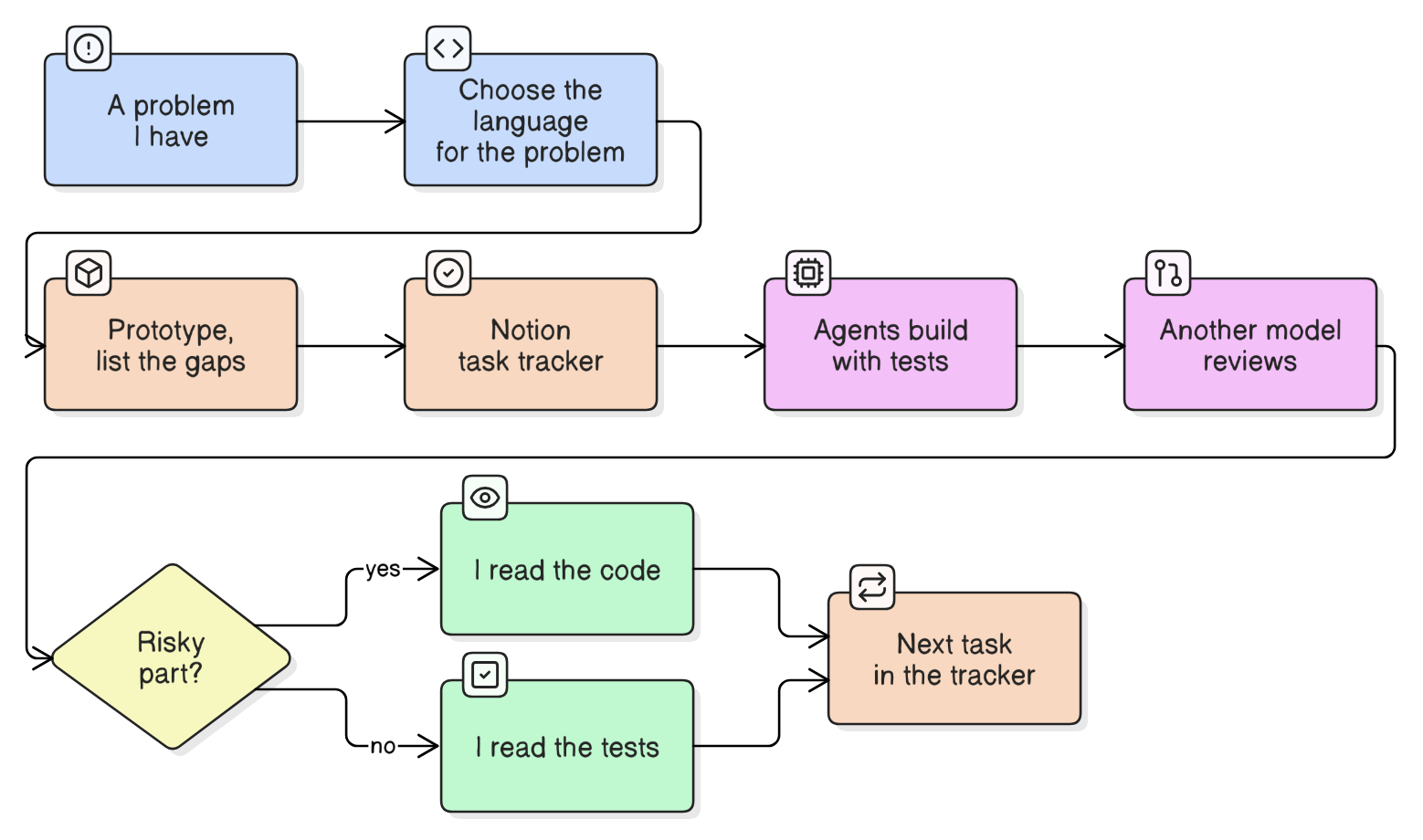
The loop
It starts with a problem I have. Most of my projects exist because I was facing the issue myself, and I work from that experience.
Then I look for the language that fits. We have a plethora of languages, so I start from the problem. I go through GitHub, see what people use for similar projects, and design from there.
- vLLM GPU Manager, Go. It is a CLI with a small web UI that manages Docker containers and proxies HTTP traffic. Go can embed the whole web UI into one binary, Docker's own client library is written in Go, and the reverse proxy comes from the standard library. Rust could do all of this, but with more effort for no real gain here.
- sshnav, Rust. It handles private keys, so memory safety mattered to me. With no garbage collector, I also control when a key is wiped from memory, which sshnav does as soon as it is done with one. Rust has solid libraries for the encryption and for building a TUI. I also wanted to get back to Rust after the VPN project at Haltdos.
- waf-tuner, Python with FastAPI. The core of it is sending logs to an LLM and checking structured answers. The LLM client libraries are most mature in Python, and FastAPI with Pydantic validates the data going in and out with very little code.
- wg-manager, Bash. It only drives tools that already exist on the server,
wgandwg-quick. A single script needs nothing installed to run, and you can read the whole thing before running it as root. - ngx_json_guard, C. There was no guessing. NGINX modules are written in C against NGINX's own API, and I wanted it in the pre-access phase. Lua would have meant adding Lua modules to NGINX, and I don't think that would have been good.
I prototype instead of writing one big prompt. One big prompt needs complete end-to-end thinking up front, which is good sometimes. What I do is build a quick prototype first, which is easy with AI, and use it. Using it shows me the weaknesses and the gaps I missed on the first pass: a case I didn't think of, a flow that feels wrong, a part that needs a different design. Those become the feature list for the agents.
I put the feature list in Notion. Once the prototype is ready, I turn the feature list into a task tracker in Notion. The agents are connected to Notion through its MCP server, so they read their tasks from the tracker and update them as they go. The tracker is how I keep track of their progress: what is done, what is in progress and what is still open.
The agents build, with tests. I use subagents and split the work by feature or by layer. For example, one subagent builds a feature from the tracker, another writes the tests for it, and another updates the docs. Every piece of code needs some kind of test, because I don't want to read all the code on my own. I read the tests to understand what is actually being checked.
A different model reviews. The model that wrote the code doesn't review it. For example, in one of my projects, sshnav, Claude Code reviewed what Codex wrote and found two bugs in the SSH config import, including one where a ProxyCommand written with an equals sign slipped past a filter. I fixed both and added tests. It works in both directions: these days, Codex usually reviews what Claude writes.
I read the risky parts myself. For things like the C module and the validators, I read the code, not just the tests. For bigger codebases it gets hard to know where to start, so I build a knowledge graph of the code with Graphify and query it in plain language. For example, in sshnav:
graphify query "where is the reconnect decision made?"
graphify query "how does connect_alias build the ssh command?" --dfs
The first gives broad context around the question and lands on the reconnect check in runner.rs, next to the functions that build the ssh command. The second, with --dfs, follows one path from connect_alias() through prepare_command() and the functions it calls. Each answer lists the files and line numbers involved, so I go straight to the code I need to read.
Then it goes back to the tracker.
What I keep for myself
The problem, the language, and the architecture are mine. So is deciding which code I read line by line. You can see how I designed each project in its own post: LoopWheeGo, waf-tuner, ngx_json_guard, vllm-gpu-manager and sshnav.
Tools
I was a terminal person for a long time and mostly used CLI tools. I've only recently started using the Claude and ChatGPT desktop apps. My setup is WSL on a Windows laptop. I prefer Linux for development, but I still want to build for Windows too.
- Claude Code is my main coding agent, and Codex is what I use for review and verification. I have also tried Cursor and OpenCode.
- Ponytail is one of the best skills I've found. It works like a senior engineer sitting in your laptop. I use it to understand what is in a codebase before an agent reviews it, and sometimes to audit one. It is good at catching the unused functions AI agents tend to leave behind.
- Impeccable for frontend work.
- Graphify turns a codebase, or any other input, into a knowledge graph that I query, as shown above. It helps when AI has written so much code that I can't keep track of it, when I'm working on someone else's project, and when switching from one coding agent to another. It also makes reviews easier, because the reviewing model can find its way around the code.
- Language servers (LSP), which help agents and me understand the program.
- Notion for the task trackers, plans, technical documents and my own reference docs, and to share things with a team on private projects. As with Eraser below, I connect the agents to Notion's MCP server, so they can read and update the tracker directly.
- Eraser for diagrams. I connect Claude to Eraser's MCP server, and the agent writes each diagram as code, which Eraser renders. Most of the diagrams on this site, including the ones in these posts and in the vllm-gpu-manager docs, were made this way. Writing a diagram as code means I can ask for a change, such as a decision added or the layout made horizontal, without redrawing it.
- Wispr Flow for dictation. I speak my posts instead of typing them. Claude then cleans up the text and checks the technical claims against the code, and I go through it before it is published. That is what the note at the bottom of each post says.
The models I use, and what I think of them
I'm a curious person, and I like to understand how things work underneath. I follow AI news and read a lot of blogs, and when I see people using a new tool or model, I try it on my own work and judge whether it is good enough for what I do. That is why I've used so many of them. Evaluating a tool like Claude Code, Cursor or OpenCode usually means evaluating its models too.
How I got here
I started using AI heavily in late 2025, with Claude on the $20 plan. Sonnet was my main model, because Opus used up the limits too quickly. In 2026, free subscriptions and credits from events, including a ChatGPT Pro subscription, let me try ChatGPT, Cursor's Composer, Grok and GLM side by side on real work. Then Opus 5.5 came out. It performs well and uses far less of my limits, so it became my everyday model.
What I use now
As of November 2026:
- Claude Opus 5.5 for day-to-day coding and agentic work, the tasks where an agent works through a codebase on its own.
- ChatGPT for verification, review and research. I use it less than before. It is good, but slower for quick tasks.
- Z.ai's GLM models for security engineering work. Between May and July I spent $250 of Token Router credits on GLM 5.2 for one of my projects that needed a large rewrite, and I was very happy with how it went. Recently I've moved to GLM 5.3. Their subscription starts at $18 a month, and they have been very generous with usage resets. GLM 5.3 Flash now takes images as well as text, which fixed my biggest complaint about the earlier, text-only models.
- DeepSeek when I need to integrate an LLM API into a project. It is very cheap: I put in about $10 and still haven't used it all up. DeepSeek V4.1 Flash is an excellent model, and I'm happy to recommend it to anyone. I first ran it on the lab's GPUs, but the context was limited and part of the weights had to sit in system memory, so I moved to the hosted API. waf-tuner talks to any OpenAI-compatible API, so this is what I point it at.
- Local models, such as Qwen3.8-27B and NVIDIA's Nemotron models, served with my own vLLM GPU Manager. They are good for agentic tasks.
If you're choosing
This is from my own experience, not a benchmark.
- For most coding, Opus 5.5. On medium or high effort it is good enough for most work, and you still get plenty of usage on a normal plan.
- For research and review, ChatGPT.
- For security engineering and red teaming, such as vulnerability research, reviewing vulnerabilities, security audits or writing proof-of-concept exploits: Claude and ChatGPT both have safeguards, and even legitimate work sometimes triggers them and gets blocked. Anthropic and OpenAI both run verification programs for security professionals, but they involve vetting, and not everyone doing good security work can get in. For this kind of work, Z.ai's hosted GLM models are good enough. If you're handling any sensitive data, such as logs or your own security data, host the GLM models yourself instead. They are open-weight on Hugging Face, so you can run them on your own infrastructure and keep the data there.
- For API usage on a budget, DeepSeek.
Which models wrote my projects
LoopWheeGo was written by Gemini 3.1 Pro from my architecture, and it was the first project where I let AI do all of the coding. sshnav was written by Codex and reviewed by Claude Code. One pull request was written by the Cursor agent, which the README says, and a GitHub Actions workflow asks Copilot to draft the changelog after each release. The ngx_json_guard parser was written with ChatGPT's 5.6 models, while where the module sits in NGINX was my decision, and I read the C code myself. waf-tuner was written with Claude Sonnet, and vllm-gpu-manager with Codex. The screenshots in the vllm-gpu-manager docs were captured with the agent-browser CLI.
I dictated this post with Wispr Flow. Claude cleaned up the text and checked the technical details against the code, and I reviewed it before publishing.