I just wanted to write Rust again
- Rust
- Tooling
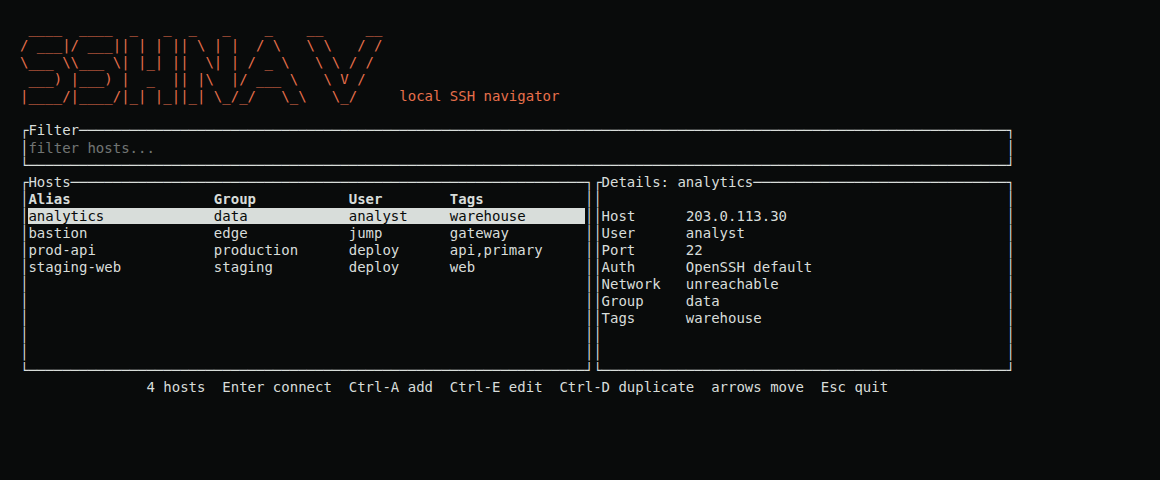
sshnav is a terminal SSH navigator. It keeps my hosts in a local database, lets me fuzzy-search them, and connects with sshnav connect <alias>. No IP address, no key path. It is written in Rust and runs on Linux and macOS terminals. This post goes through the decisions I'd defend, and one I wouldn't.
Why I built it
There were plenty of alternatives, and I built it anyway, because I wanted to get back to Rust. The last time I wrote Rust was on the VPN project at Haltdos. When I started as a student researcher at the NUS security research lab, I was managing a lot of servers again.
I had tried the plain SSH config and shell aliases. I used ssh for private-network machines and sshp for production, all with one shared key, and one key for every server is not a good idea. I also used Termius, a GUI client. On my Windows laptop it was slow, and I'm not a fan of GUIs that load a lot of information. I wanted something simple in the terminal.
I didn't explain any of the coding to the agent. I drew the interface on paper, showed it, and said "this is the kind of interface I need". I described how I wanted it to work, and Codex wrote the code.
Decision 1: wrap OpenSSH, don't reimplement it
sshnav does not implement SSH. It builds the ssh command as a list of arguments, never as a shell string, and runs the OpenSSH that is already on the machine. So host-key checking, the agent and jump hosts all go through OpenSSH's normal behaviour, and I don't own any of the protocol code. Building the command as a list also means a strange hostname or option can't turn into a shell command.
Decision 2: one host, one key
This was the practical reason I started. Each host can have its own key, and when adding a host you can press Tab to search for key paths. You can also duplicate a host, which copies every setting and gives the copy its own encrypted key record.
Everything lives in a local SQLite database: aliases, groups, tags, users, ports, forwards and SSH options. The picker filters as you type, with prefixes like g: for group and t: for tag. If you already have an ~/.ssh/config, you can import it, including the Host * defaults, and sshnav can generate an OpenSSH include file back out.
Decision 3: reconnect, but only when it makes sense
The experience is infuriating when a connection drops in the middle of work, so I added reconnect, but I kept it narrow on purpose.
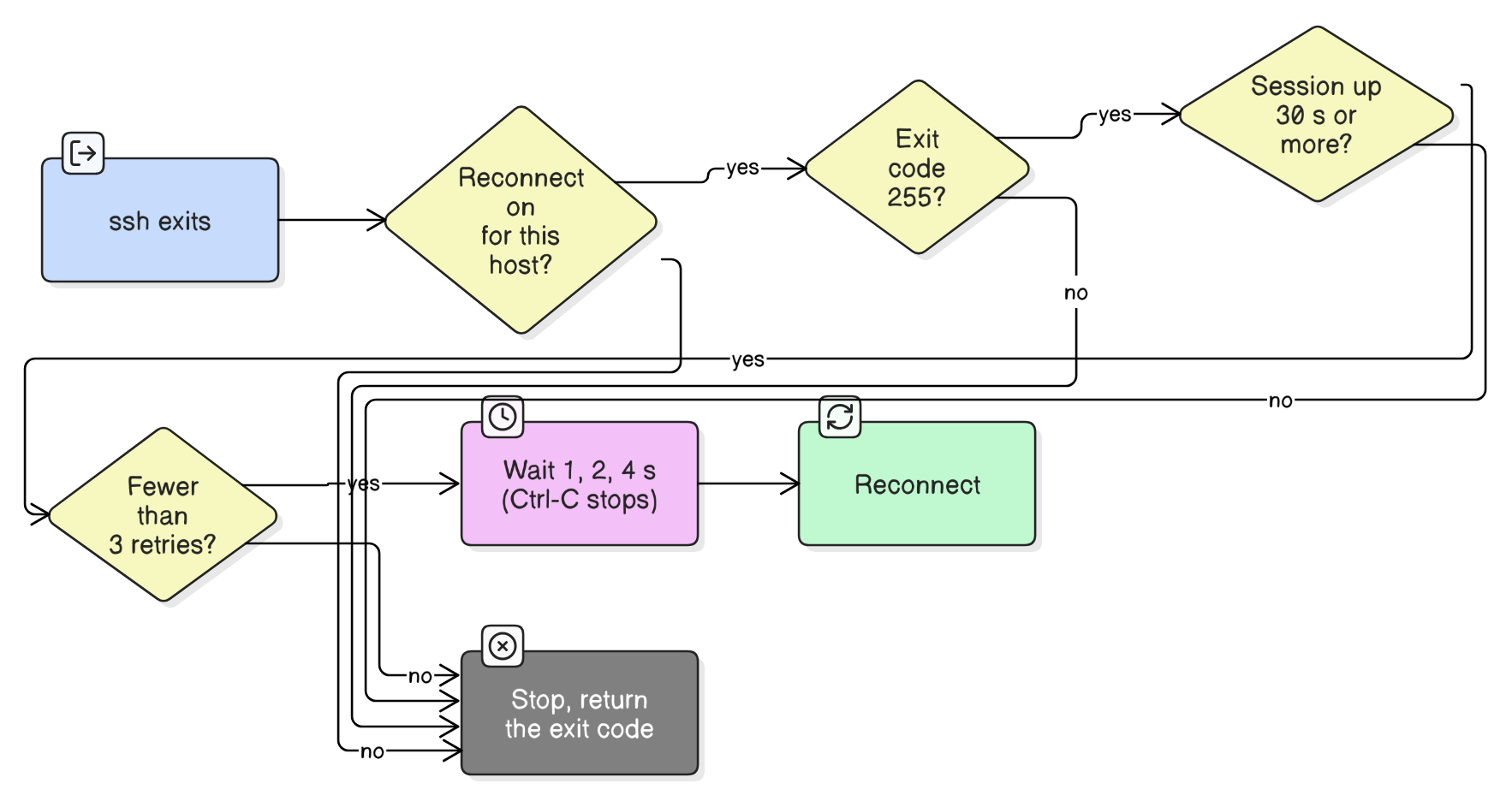
It only retries when all four are true: the host has reconnect turned on (it is opt-in per host), ssh exited with code 255, which is its connection-lost code, the session had been up for at least 30 seconds, and there have been fewer than three retries. A normal exit, or a login that fails right at the start, never triggers it, so a wrong password doesn't turn into a retry loop. The wait between tries doubles, 1, 2 and then 4 seconds, and Ctrl-C stops it.
Two bugs a review caught
I had Claude Code review the code that Codex wrote, and it found two bugs in the config import.
Forwards like LocalForward 15432 localhost:5432 were stored in config syntax and passed to ssh -L as they were, so ssh refused to start. The flag needs 15432:localhost:5432, so the command builder now converts it.
The second one was a security bug. A line like ProxyCommand=sh -c '...', written with an equals sign instead of a space, slipped past the filter that comments out directives that can run commands. It would have been written live into the generated include file. I fixed both on 22 October and added tests, including ones that check that ProxyCommand and LocalCommand lines never end up active in the generated file.
The decision I wouldn't defend: how keys are stored
When you import a private key, sshnav encrypts it before it goes into the database, with XChaCha20-Poly1305 and a key derived with Argon2id. The weak point is where the encryption key lives. It sits in an owner-only file on the same machine, so it does not protect you from someone who already controls your user account.
I chose a file because I wanted it to work in headless terminals, where a desktop keyring may not exist. The current key storage is very limited, and I'll need to fix it. A better answer would use each operating system's own secret storage, but they all behave differently, and I haven't figured that out yet. I also want sshnav to work on Windows, which it doesn't today, so both need sorting out together. The README states this limit too, and I'd rather say it here than let you assume more than it does.
Daily use
I use sshnav every day. I set a host up once, and after that sshnav connect <alias> is all I type. It has made my day-to-day work a bit more efficient, and that was the point.
The code is at github.com/Vulcanite/sshnav, and the docs are at vulcanite.github.io/sshnav.
I dictated this post with Wispr Flow. Claude cleaned up the text and checked the technical details against the code, and I reviewed it before publishing.