Rejecting bad JSON before it reaches your app
- C
- Security
ngx_json_guard is an NGINX module that checks the structure of a JSON request body before the WAF sees it. It rejects malformed JSON and bodies that go over limits I set, such as nesting depth, string length and number of keys. It does not look for attacks. ModSecurity still does that. The code is at github.com/Vulcanite/ngx_json_guard.
This post is a log of the decisions behind it, starting with the problem.
The problem
I've wanted to build this since my time at Haltdos. More and more of our customers were sending large JSON payloads. It is not a good practice, but some companies don't change. With JSON, people can send malformed payloads or bomb-style payloads that are expensive to process.
Cloud WAFs handle this by limiting how much of the body they inspect. AWS WAF, for example, inspects only the first 8 KB to 64 KB of a request body, depending on the service (AWS documentation). By default, anything after that limit is not inspected, so an attacker can put the payload there. Inspecting the whole body costs time, because JSON is not text you can scan directly. It has to be parsed from a string into keys and values first, and then every key and value is matched against the signatures. On a reverse proxy in front of a high-traffic site, that is expensive.
Decision 1: don't raise the body limit, parse the JSON
The first idea most people have is to raise the WAF's body limit. That does not solve it. A bigger limit only gives the WAF more to parse. So I went after a narrower question, in front of the WAF: is this JSON well formed, and does it stay inside the limits I set?
Decision 2: check structure only
I am not inspecting content. I'm not looking for SQL injection or XSS, because ModSecurity already does that. I'm not trying to do attack inspection faster than it does. The module only answers whether the document is valid and inside the limits: depth, key length, string length, number length, number of tokens, and members per object or array. Duplicate keys can be rejected too, if you turn that on. The defaults are generous, and you tune them to your API.
Decision 3: a custom parser, not cJSON or lua-cjson
There are existing libraries I could have used, like cJSON or lua-cjson. When I tried modules like these at Haltdos, what I remember is memory. They decode the whole document, and that increased RAM consumption. That is a memory from a long time ago, not a measurement I can show you.
That is also why a custom parser fits this job. A library that decodes the whole document into a tree or a table needs memory that grows with the body. The guard is a streaming parser in C. It keeps one fixed control block of 16,600 bytes, whatever the size of the body, because all it has to answer is whether the document breaks a limit. I haven't benchmarked it against cJSON or lua-cjson, so I'm not claiming it is faster than them.
For the parser itself I used AI. My focus was on deciding where to put it, so that JSON inspection works without adding much latency to request processing.
Decision 4: run before ModSecurity, leave the body untouched
The module runs in NGINX's pre-access phase, just before ModSecurity. It reads the body through the same NGINX path other modules use, feeds it to the parser in bounded chunks, and on success returns without changing anything. The body stays available, so ModSecurity and the Core Rule Set still scan all of it. On failure, the request is answered before it is proxied anywhere.
The order matters. The example config loads the guard before ModSecurity, and the integration tests check that the guard runs first. The module-load order alone is not a portable guarantee in NGINX, so you should test the order with the exact builds you deploy.
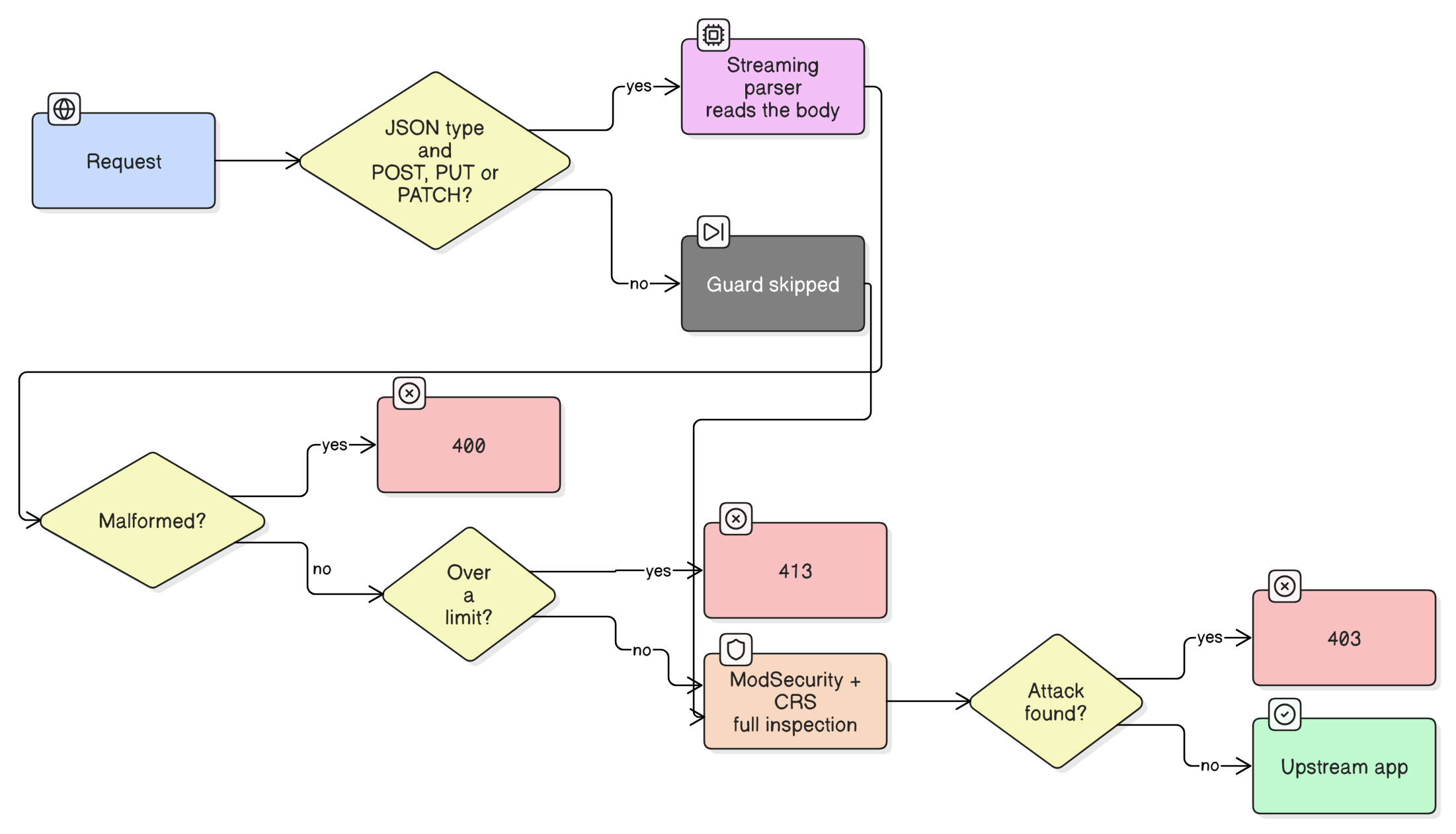
The guard only looks at requests with a JSON content type (application/json and application/*+json) and the methods POST, PUT and PATCH by default. Other requests and empty bodies skip it. A malformed body gets a 400, an exceeded limit gets a 413, and an internal error gets a 500.
What the evaluation showed
I ran the evaluation on my own test machine. The full tables and caveats are on the documentation site.
- The parser handles about 260 to 271 MiB/s on a single thread, for bodies from 100 KiB up to 20 MiB.
- The guard's share of a request is small. On a 1 MiB JSON body it takes about 4.1 ms of a 77 ms request (5.3%). On a 20 MiB body it takes about 96 ms of 2.9 seconds (3.3%).
- On my test set of 11 kinds of structural violations (bad syntax, invalid UTF-8, deep nesting, huge arrays, long keys and so on), the guard rejects all 11. With no rules loaded, ModSecurity's JSON processor rejects 6 and Coraza's rejects 5.
What it saves, and what it doesn't
The thing I cared about most was an attack hidden at the very end of a big body. A lot of setups stop inspecting after some size limit, and an attacker puts the payload after that limit. In my test, a 20 MiB document with SQL injection at the tail passes the guard in about 83 ms, and then the full Core Rule Set still scans the whole body and blocks it with a 403. The tail is not skipped.
The savings come from rejecting bad bodies early, because they never reach the rules. With 20 MiB bodies:
| Case | Result | Latency |
|---|---|---|
| Clean body, accepted | 200 | 2920 ms |
| Malformed JSON at the tail | 400 from the guard | 313 ms |
| Over the token limit | 413 from the guard | 241 ms |
Without the rules loaded, rejecting a malformed tail was 40.4% faster with the guard in front (323 ms against 542 ms for ModSecurity's JSON processor alone).
It is not free. If the body is good and ModSecurity's JSON processor is on, the body gets parsed twice, once by the guard and once by the processor. That cost 19.1% more end-to-end than the processor alone, so the guard only makes sense if you expect a real share of bad or oversized JSON. It also doesn't reduce NGINX's own memory use, because NGINX has already buffered the body before the module runs. What it protects is the WAF behind it: in my runs, the guard plus ModSecurity peaked at 1150 MiB, against 1654 MiB for ModSecurity alone.
Other limits: it does not decompress bodies, it does not support NDJSON, and it skips multipart bodies. It is a guard layer in front of the WAF, not a replacement for it.
I dictated this post with Wispr Flow. Claude cleaned up the text and checked the technical details against the code, and I reviewed it before publishing.